
Lightning Loader
Professional 3D Cargo & Load Planning Software
Containers • Trucks • Air Freight • Sea Freight
Built for SMEs: Enterprise Capability Without Enterprise Cost
Lightning Loader is optimised for small and medium-sized businesses that need powerful logistics tools without long implementation projects.
Start in minutes, train teams quickly, and access practical 3D planning and warehouse tools for around $20/month.
3D Load Planner – Visualise & Optimise
Model your cargo and containers in 3D to eliminate guesswork and maximise capacity.
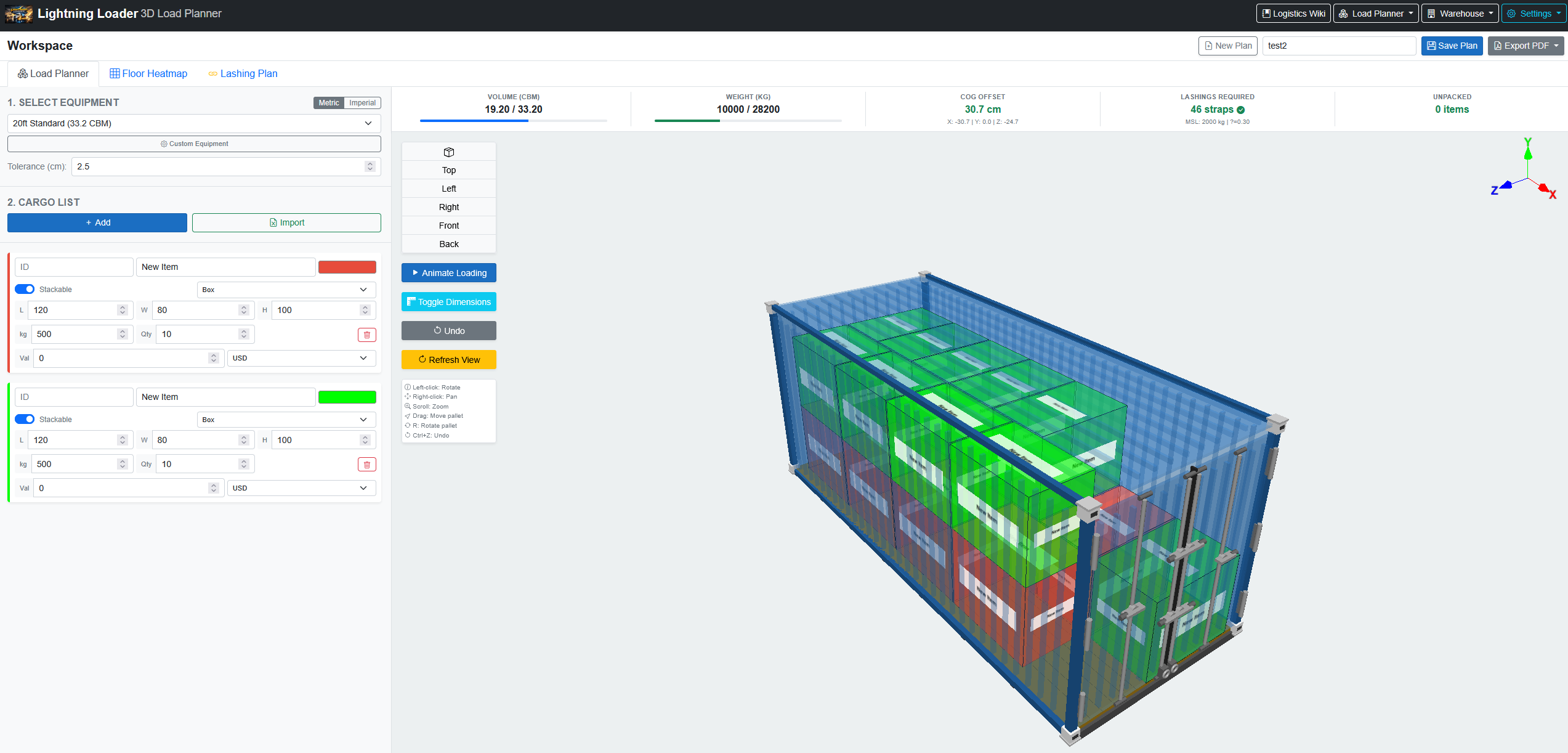
Maximised Space Utilisation
Achieve higher container fill rates. Fewer containers means lower freight spend and improved margins.
Up to 30% better fill rateCargo Safety & Compliance
Weight distribution analysis ensures axle load limits are met. Automatic flagging protects against claims.
Safe & CompliantReduced Loading Time
A clear, sequenced load plan eliminates guesswork. Loaders follow instructions to turn around faster.
Faster dock turnaroundWarehouse Digital Twin – Live Visibility
A realistic 3D replica of your physical warehouse connected to live inventory data.
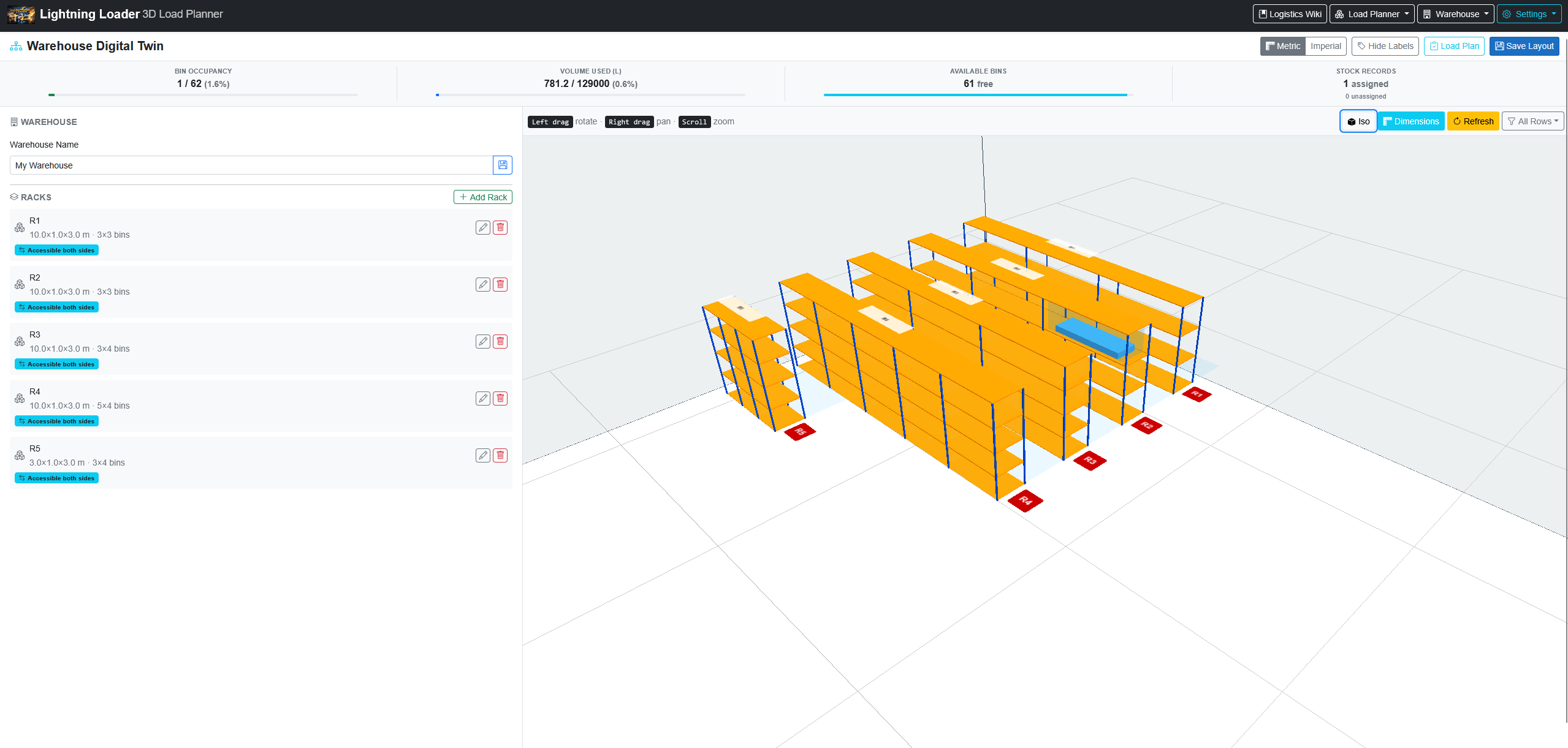
Improved Space Utilisation
Visualise under-used areas and redistribute stock to increase storage density without costly physical changes.
15–25% improved densityRisk-Free Layout Testing
Experiment with aisles, racks, and configurations in the model before committing resources or labour.
Zero cost layout trialsReal-Time Inventory Visibility
Managers and planners see exactly where stock is at any moment, supporting faster decision-making.
Accurate bin trackingHow Lightning Loader Works
Three simple steps to transition from guesswork to optimized 3D planning.
Input Dimensions
Enter your cargo size, weight, and quantities, along with your chosen transport containers or warehouse space.
Auto-Calculate
Our advanced algorithms process the data to generate the most space-efficient and compliant layout in seconds.
Export & Execute
View the 3D model, export step-by-step loading plans, and share them directly with your warehouse floor team.
Drive Business Productivity
Purpose-built features designed to reduce costs, save time, and boost your bottom line.
Reduced Freight Spend
By maximizing space utilization per container, you ship more goods per trip, significantly lowering your overall transportation costs and improving profit margins.
Minimized Damages & Claims
Smart weight distribution and stacking rules prevent cargo damage during transit, saving your business from costly insurance claims and replacement delays.
Accelerated Operations
Clear 3D loading blueprints eliminate confusion on the dock. Loaders work faster and more confidently, reducing dock turnaround times and labor costs.
Cloud-Based Collaboration
No installation required. Managers plan from the office while floor teams view the exact same live 3D plan on their tablets, ensuring everyone stays aligned.
Incredible ROI for Just $20/Month
Scale your usage to save time and massively reduce freight costs—all under one simple subscription.
Quick Usage
Instant 3D Load Planning: Generate optimal load plans and export detailed step-by-step PDF guides in just a couple of minutes. Eliminate guesswork instantly, speeding up loading dock operations and reducing costly errors.
Intermediate Usage
Inventory Integration: Import your product catalogs and utilize inventory management tools to enhance your 3D loading and exports. Ensure accurate shipping manifests and boost your fill rates even further.
Advanced Usage
Warehouse Digital Twin: Unlock the full suite of features by maintaining a real-time digital twin of your warehouse. Combine layout optimization, live inventory tracking, and 3D planning for unmatched operational control and savings.
All included for a flat subscription of $20 per month
Trusted by Logistics Professionals
Built in Australia. Loved worldwide.